
Set up your household
Basic household information helps determine which preparedness capabilities actually apply to you.
Included with The Complete Survival System
The interactive control center that turns household preparedness into something you can see, track, and act on.
Instead of dropping hundreds of files in your lap and telling you to figure it out, the Survival Assistant starts with your household: How ready are we? What are our biggest gaps? What should we do next?
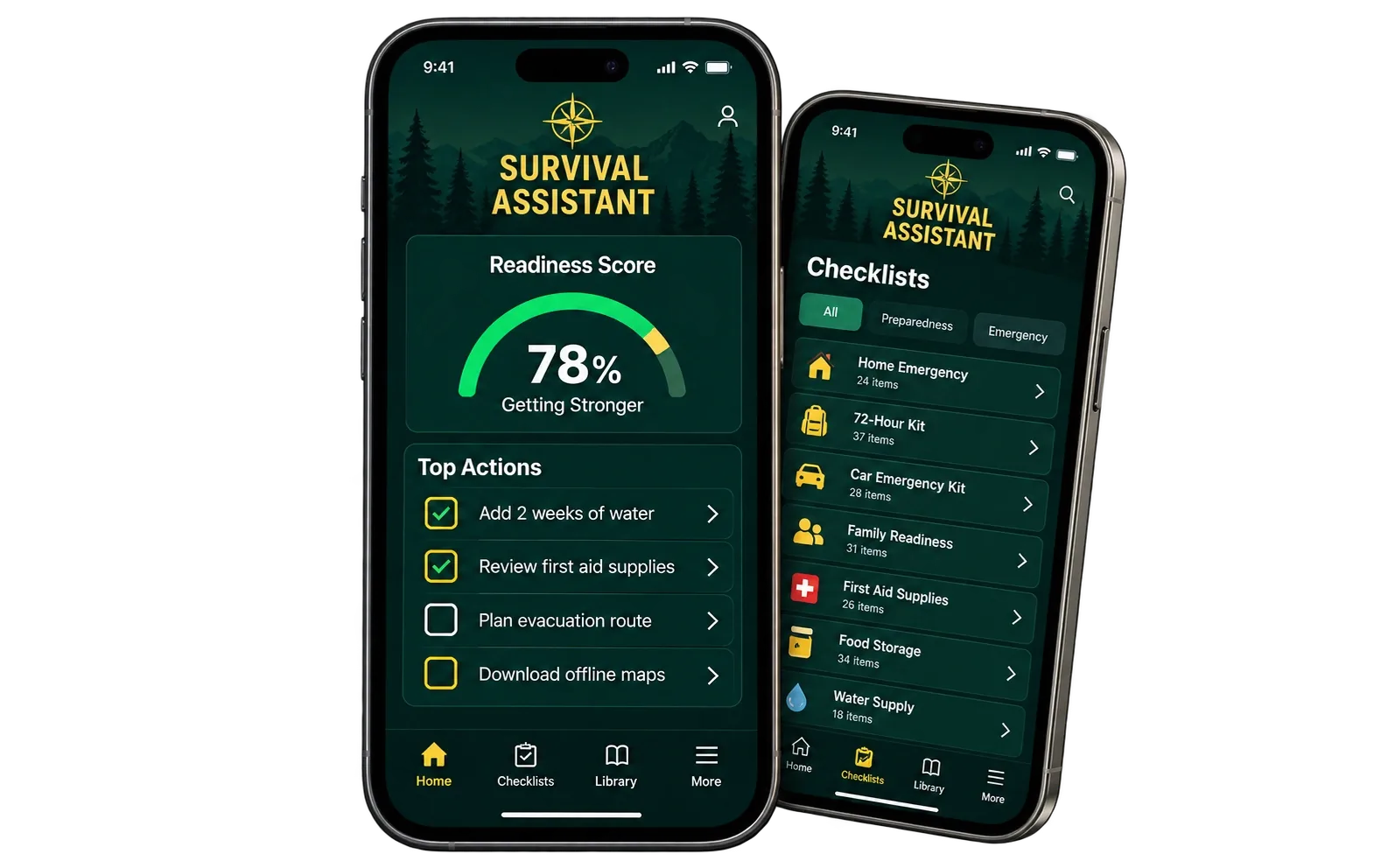
Family first. Archive second.
The Complete Survival System already gives you the permanent knowledge: the Quickstart, 15 household checklists, Survive & Thrive, the Guided Library Index, the Survival Library, and the Advanced Reference Archive.
The Survival Assistant adds the part paper cannot: it remembers your household state, calculates readiness, identifies gaps, keeps checklist progress, tracks supplies, saves plans, and routes you to the right information when a real need appears.
The app should answer three questions every time you open it:
How ready are we? What are our biggest gaps? What should we do next?From information to action
You do not need to organize the entire Survival Library before the system becomes useful. Start with your household, close the most important gaps, and go deeper only when you need to.
Basic household information helps determine which preparedness capabilities actually apply to you.
The dashboard calculates overall readiness, readiness by area, checklist completion, and any safety-critical gaps.
The app ranks the next actions by safety, prerequisites, household relevance, and overdue reviews.
Work through interactive checklists, add supplies, calculate water, and save communication and evacuation plans.
Open Emergency Mode, your saved plans, or the offline library without having to search the internet from scratch.
As items are completed, supplies change, or plans are updated, the dashboard recalculates what still matters.
What is inside the app
Every major screen has a practical purpose. Nothing here requires you to become a survival expert before you can start.
See an overall household readiness score, readiness by area, safety-critical gaps, and the three actions that matter most next.
Work through all 15 Family Readiness Checklists inside the app. Progress saves locally as you go.
Track what you have, where it is stored, and when it needs review. Water and food quantities feed directly into readiness.
Calculate household water needs for 3, 7, 14, or more days and see exactly how many gallons are still missing.
Build and save communication and evacuation plans so meeting places, routes, contacts, and priorities are ready before stress takes over.
Open calm, immediate guidance for power loss, unsafe water, evacuation, severe weather, separation, vehicle trouble, and first-aid situations.
Search built-in preparedness guidance from Survive & Thrive and The Complete Survival System, even when the connection is gone.
Ask what to do next, how much water you are missing, whether you are ready for a blackout, where your biggest gaps are, and more.
Run a real device check for the app cache, local storage, and built-in knowledge instead of relying on a vague offline promise.
Export a backup, restore it, selectively delete saved information, or wipe everything from the device and start fresh.
The dashboard
The dashboard combines an overall readiness score with individual preparedness areas, checklist completion, safety-critical gaps, and your top three actions. A high score cannot hide a critical missing requirement.
The action layer
The checklists, inventory, plans, and calculators are not isolated tools. They feed the readiness system. Add water to supplies and the water requirement updates. Finish a family plan and the related communication or evacuation capabilities change. Complete checklist work and your progress becomes visible.
That is the difference between reading about preparedness and operating a preparedness system.
IMMEDIATE GUIDANCE
When the problem is happening now
A blackout, unsafe water warning, evacuation, severe storm, family separation, vehicle problem, or first-aid situation should not depend on an AI model deciding what sounds right. The app keeps immediate guidance and saved family plans available as deterministic, offline-capable product features.
Life-threatening emergencies still require emergency services. The app is designed to help you stay organized, retrieve saved plans quickly, and take calm practical steps while normal systems are disrupted.
Guidance without guessing
The current Assistant can answer practical questions from household information already saved in the app, the readiness engine, your checklists, inventory, plans, and the built-in Survival Library.
Private by design
The current app stores household details, checklist progress, notes, supplies, plans, and assistant conversation in the browser on the device. It does not require those records to be sent away for analytics or AI.
The app can check whether the current device actually has the app cache, local storage, and built-in Survival Library needed for offline use.
Designed for the day the connection is not there
The app includes an Offline Readiness screen that checks whether the app itself is cached, whether your local information can be saved, and whether the built-in Survival Library is available on the device.
The permanent downloadable files in The Complete Survival System remain the deeper offline ownership layer. The app adds fast household state, plans, tools, emergency access, and searchable core guidance on top of those files.
Part of the bigger system
When you need a quick answer, the app is fast. When you need practical explanation, Survive & Thrive is there. When you need deep reference material, the Guided Library Index and 950+ manual Survival Library are there. The Complete Survival System gives each layer a job.
See everything included in The Complete Survival System →Survival Assistant FAQ
It is the interactive software layer inside The Complete Survival System. The permanent downloadable book, checklists, indexes, and Survival Library remain valuable on their own; the app makes those layers easier to use as an active household preparedness system.
No mandatory cloud account is required for core use. The current app stores household details, checklist progress, supplies, plans, and assistant history locally in the browser on the device.
The app is built as an offline-capable PWA. After offline setup, essential saved content, checklists, plans, calculators, emergency guidance, and the built-in searchable library are designed to remain available locally. The app also includes an Offline Readiness screen that tests the current device.
No. Readiness scoring, calculations, fixed preparedness rules, and safety-critical emergency behavior are deterministic. The Assistant explains, retrieves, guides, and routes you through the system; critical functions do not depend on AI.
The current Assistant can answer common household-aware questions such as what to do next, how much water is missing, blackout readiness, critical gaps, lowest-scoring areas, saved evacuation or communication plans, checklist navigation, inventory, food coverage, and built-in library topics.
It is intentionally bounded. If the app does not have support for an answer in your saved household information or its approved built-in knowledge, it says so rather than pretending to know.
Yes. The app can export a customer-controlled JSON backup, restore a valid backup, delete selected information such as assistant history or household details, or delete all locally saved app data.
No. That is the point of the design: Family first. Archive second. The app tells you what matters now and routes you into the book or deeper library when you actually need more explanation or reference depth.
Turn preparedness into a system you can actually operate
The Survival Assistant is included with the Complete Survival System alongside the 214-page Survive & Thrive guide, 15 action checklists, the Guided Library Index, the 950+ manual Survival Library, and the offline-ready resource files you can keep.